

Detailed Walkthrough#
This page walks through how annbatch works in depth.
For a hands-on, runnable version, see the quickstart notebook.
Preprocessing of On-Disk Data#
collection = DatasetCollection("path/to/output/store.zarr").add_adatas(
    adata_paths=[
        "path/to/your/file1.h5ad",
        "path/to/your/file2.h5ad"
    ],
    shuffle=True,  # shuffling is needed if you want to use chunked access
)
First, you convert your existing .h5ad files into a zarr-backed anndata format.
In the process, the data gets shuffled and is distributed across several anndata files.
Shuffling is important to ensure model convergence, especially because of our contiguous data fetching scheme which is not perfectly random.
Shuffling also helps improve performance because it ensures uniform data types across your training dataset i.e., matrices all of float64 type.
This allows efficient preallocation of pinned memory.
The output is a collection of sharded zarr anndata files, meant to reduce the burden on file systems of indexing.
See the zarr docs on sharding for more information.
For performance considerations, see our dedicated docs page: Preshuffling Performance Considerations.
If your data fits in-memory, consider simply shuffling in-memory and passing it to the loader.
Data loading#
Chunked access#
# `use_collection` will automatically get everything in `X` and `obs` and yield it.
ds = Loader(
    batch_size=4096,
    chunk_size=32,
    preload_nchunks=256,
).use_collection(collection)

# Iterate over dataloader (plugin replacement for torch.utils.DataLoader)
for batch in ds:
    x, df, index = batch["X"], batch["obs"], batch["index"]
The data loader implements a chunked fetching strategy where preload_nchunks number of contiguous-chunks of size chunk_size are loaded.
chunk_size corresponds the number of rows of anndata store to load sequentially.
This number can be quite large for pre-shuffled data but not for un-shuffled data.
For performance reasons, you should use our dataloader directly without wrapping it into a torch.utils.data.DataLoader regardless of matrix type.
Your code will work the same way as with a torch.utils.data.DataLoader, but you will get better performance.
In order to take advantage of the sharded zarr files performance, though, locally, you must set the codec pipeline to use zarrs-python when reading.
Using zarr on its own will not yield high performance for local filesystems.
We have not tested remote data (i.e., using zarr.open() with a zarr.storage.ObjectStore) but because we use zarr, this data loader should also work over cloud connections via relevant zarr stores.
Note that zarrs-python cannot be used with these sorts of non-local stores.
Important
As mentioned above, ensuring uniform dtypes across your training collection is important for performance. For in-memory data, this transformation should be trivial.
User configurable sampling strategy#
We support user-configurable sampling strategies like weighting or sampling by implementing the abstract annbatch.abc.Sampler.
Please open an issue if you want to contribute a new sampler to this repo.
Warning
Provided implementations of Samplers use NumPy’s random number generator to generate random numbers and do not use or respect torch.manual_seed(). Setting torch.manual_seed() will have no effect on the reproducibility of data loading.
To control reproducibility, pass a seeded numpy.random.Generator via the rng parameter:
import numpy as np

rng = np.random.default_rng(42)
sampler = RandomSampler(..., rng=rng)
Using annbatch with torch.utils.data.DataLoader is neither explicitly supported nor guaranteed to behave as expected with respect to seeding and worker behavior.
Speed comparison to other dataloaders#
We provide a speed comparison to other comparable dataloaders below:
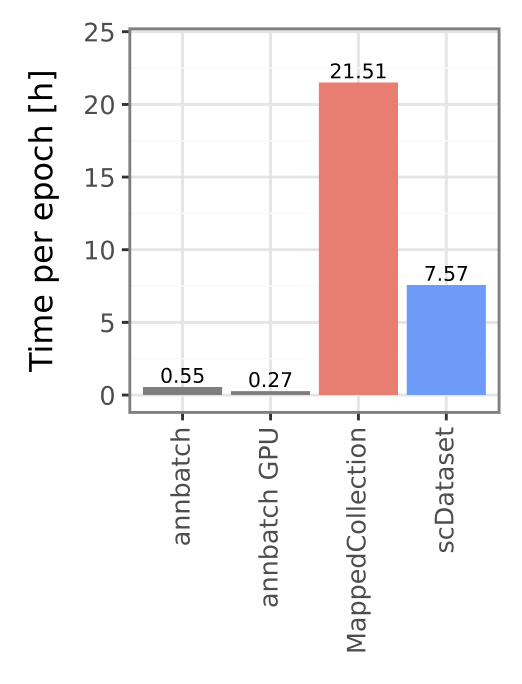
Please see our paper [GFA+26] for a more detailed comparison.
Why does data loading speed matter?#
Most models for scRNA-seq data are pretty small in terms of model size compared to models in other domains like computer vision or natural language processing. This size differential puts significantly more pressure on the data loading pipeline to fully utilize a modern GPU. Intuitively, if the model is small, doing the actual computation is relatively fast. Hence, to keep the GPU fully utilized, the data loading needs to be a lot faster.
As an illustrative example, let’s train a logistic regression model (notebook hosted on LaminHub). Our example model has 20.000 input features and 100 output classes. We can now look how the total fit time changes with data loading speed:
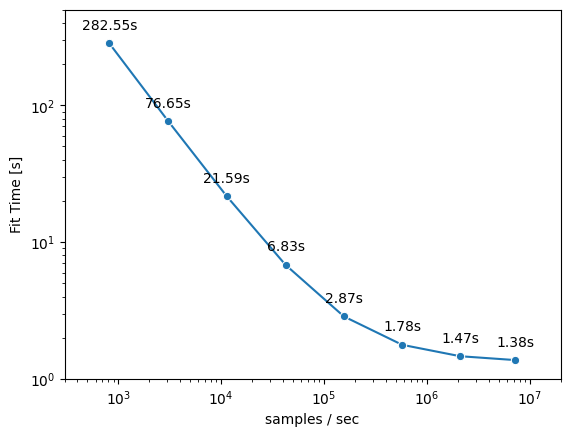
From the graph we can see that the fit time can be decreased substantially with faster data loading speeds (several orders of magnitude). E.g. we are able to reduce the fit time from ~280s for a data loading speed of ~1000 samples/sec to ~1.5s for a data loading speed of ~1.000.000 samples/sec. This speedup is more than 100x and shows the significant impact data loading has on total training time.
When would you use this data loader?#
As we just showed, data loading speed matters for small models (e.g., on the order of an scVI model, but perhaps not a “foundation model”).
But loading minibatches of bytes off disk will be almost certainly slower than loading them from an in-memory source.
Thus, as a first step to assessing your needs, if your data fits in memory, load it into memory.
To accelerate reading the data into memory, you may still find zarrs-python in conjunction with sharding still helpful in the same way it accelerates io here.
To this end, please have a look at this gist comparing file loading speeds between anndata.io.read_zarr() and anndata.io.read_h5ad().
It highlights how zarrs-python and sharding can help there as well.
annbatch natively supports in-memory data with unified var spaces (sparse and dense).
Once you have too much data to fit into memory, for whatever reason, the on-disk data loading functionality offered here can provide significant speedups over state of the art out-of-core dataloaders.